I Built a CLI to Create Prisma Generators
I built a tool to make Prisma generators easier to create. A few weeks later, Prisma invited me onto their official livestream to share it.
In December 2021, I built a little CLI because I was tired of setting up the same boilerplate every time I wanted to experiment with Prisma generators.
A few weeks later, the Prisma team reached out and invited me to join their official livestream to show it to their community.
I was 17.
That was pretty fucking cool.
On January 13, 2022, I joined Prisma’s What’s New in Prisma (v3.8.0) livestream to share what I’d built.
The funny thing is, the project itself started with a pretty boring problem.
Why I built it
Prisma has a great feature called generators.
You define your database models in a Prisma schema, run a command, and get generated code.
Prisma Client is the obvious example, but you can build custom generators for practically anything derived from your schema.
TypeScript enums. Validation schemas. API definitions. Whatever you need.
The problem was that creating a custom generator involved a bunch of setup before you could even start writing the interesting part.
Project structure, TypeScript configuration, generator handlers, testing, development workflows, publishing.
None of it was particularly difficult.
It was just annoying.
So I built Create Prisma Generator to automate the whole thing.
One command to get started
Instead of manually setting everything up, you could run:
npx create-prisma-generator
The CLI would ask a few questions and scaffold a working generator project based on your answers.
You could include a development workspace, tests, GitHub Actions, automatic npm publishing, and semantic versioning.
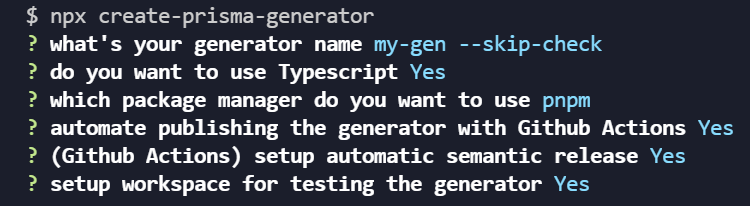
My favorite part was the development workspace.
It created two connected packages:
packages/
├── generator/
│   ├── src/
│   └── __tests__/
└── usage/
    └── prisma/
        └── schema.prisma
One contained your generator.
The other was a sample project where you could actually use it.
You could change your generator’s code, rebuild it, and immediately test the output without publishing anything.
That made experimenting with generators much easier.
Let’s generate something
The starter project came with a working example that generated TypeScript enums from a Prisma schema.
Say you had this:
enum Language {
  Typescript
  Javascript
  Rust
  Go
  Python
  Cpp
}
You could configure your generator in schema.prisma:
generator custom_generator {
  provider = "npx my-gen"
  output   = "../types"
}
Then run:
cd packages/usage
npx prisma generate
And the generator would produce:
enum Language {
  Typescript = "Typescript",
  Javascript = "Javascript",
  Rust = "Rust",
  Go = "Go",
  Python = "Python",
  Cpp = "Cpp",
}
Change the Prisma schema, run the generator again, and the TypeScript definition gets regenerated.
No more manually keeping the same definitions in sync.
Simple, but pretty useful.
How it works
Under the hood, Prisma communicates with custom generators through JSON-RPC over standard input and output.
Fortunately, Prisma provides @prisma/generator-helper, so you don’t have to implement that protocol yourself.
It gives you two important callbacks.
onManifest describes your generator:
generatorHandler({
  onManifest() {
    return {
      version,
      defaultOutput: "../generated",
      prettyName: GENERATOR_NAME,
    };
  },
});

onGenerate is where your generator does its work.
Prisma passes information about the schema, including its Data Model Meta Format (DMMF).
For our example, we just need the enums:
generatorHandler({
  onGenerate: async (options: GeneratorOptions) => {
    for (const enumInfo of options.dmmf.datamodel.enums) {
      const tsEnum = genEnum(enumInfo);
      const writeLocation = path.join(
        options.generator.output!.value,
        `${enumInfo.name}.ts`,
      );
      await writeFileSafely(writeLocation, tsEnum);
    }
  },
});
We iterate through the enums, convert each one into TypeScript, and write the result to a file.
The 2021 template looped with forEach(async ...), which doesn’t wait for the writes to finish before onGenerate returns. A for...of loop with await does.
The conversion itself is almost embarrassingly simple:
export const genEnum = ({ name, values }: DMMF.DatamodelEnum) => {
  const enumValues = values
    .map(({ name }) => `${name}="${name}"`)
    .join(",\n");
  return `enum ${name} {\n${enumValues}\n}`;
};
That’s really the core of code generation.
Read structured data, transform it, and write the output.
You can build much more interesting generators, but the basic idea stays the same.
Making development painless
I didn’t want the CLI to just generate some starter files and leave you to figure everything else out.
So it also set up a development workflow.
In one terminal:
cd packages/generator
pnpm dev
This watches your source files and recompiles them as you make changes.
In another:
cd packages/usage
npx prisma generate
Now you can make changes to your generator and immediately see the results.
No publishing. No reinstalling packages.
I also included Jest tests and a sample Prisma schema so developers could start testing their generators right away.
And if you wanted the full setup, the CLI could configure GitHub Actions, Husky, commitlint, and semantic-release.
That meant conventional commits like:
git commit -m "feat: add validation schema generation"
Could drive automated versioning and publishing once the necessary credentials and permissions were configured.
The goal was to make all the boring infrastructure disappear so developers could focus on building something useful.
From a little CLI to Prisma’s livestream
What made this project memorable wasn’t how technically complicated it was.
It wasn’t.
It was a relatively small tool solving a relatively small problem.
But apparently, it was a problem worth solving.
A few weeks after publishing it, I was invited to join the Prisma team live and share it with their community.
At 17, getting that invitation was a pretty surreal experience.
And it taught me something I’ve kept coming back to while building open-source software.
You don’t have to build the next revolutionary framework.
Sometimes you just have to notice something annoying, fix it, and share the solution.
You never really know who’s going to find it useful.
Originally published on dev.to on December 25, 2021, and updated January 11, 2022. This article documents the original Create Prisma Generator project and its historical Prisma APIs. Some dependencies and workflows may differ in modern versions. The code is on GitHub and the CLI is on npm.